How to Make a Live Photo from a Video on iPhone
Updated July 28, 2026
Live Photos capture a moment in motion — but iOS still has no built-in way to turn an existing video into one. The fastest fix is a free converter app: with LiveMaker, a video-to-Live-Photo converter for iPhone, you pick a clip, trim it to the best few seconds, choose the still frame, and save the result to your camera roll — entirely on your device, in under a minute.
What you'll need
An iPhone or iPad on iOS 16 or later, the free LiveMaker app, and any video in your Photos library or Files app. That's the whole list — the conversion happens on the device itself, so you don't need Wi-Fi, an account, or a desktop tool. It works in airplane mode.
Why doesn't iOS do this by itself?
A Live Photo isn't a normal video file. Under the hood it's a pair: a full-resolution still image plus a short video clip, bundled so that the Photos app knows to play the motion when you press and hold. The Camera app creates that pair only at the moment you take the picture — Apple gives you no way to build one from footage you already have. The Photos app can go the other direction (save a Live Photo as a video), but not this one.
That's the gap a converter fills: it takes your existing video, lets you choose a segment and a still frame, and writes out a correctly paired Live Photo that iOS treats exactly like one captured with the Camera. Web-based converters exist too, but they require uploading your footage to someone else's server — more on that trade-off below.
Step by step
The whole flow is three screens: pick a clip, shape it, save it. Here's each step in detail.
-
Pick your video
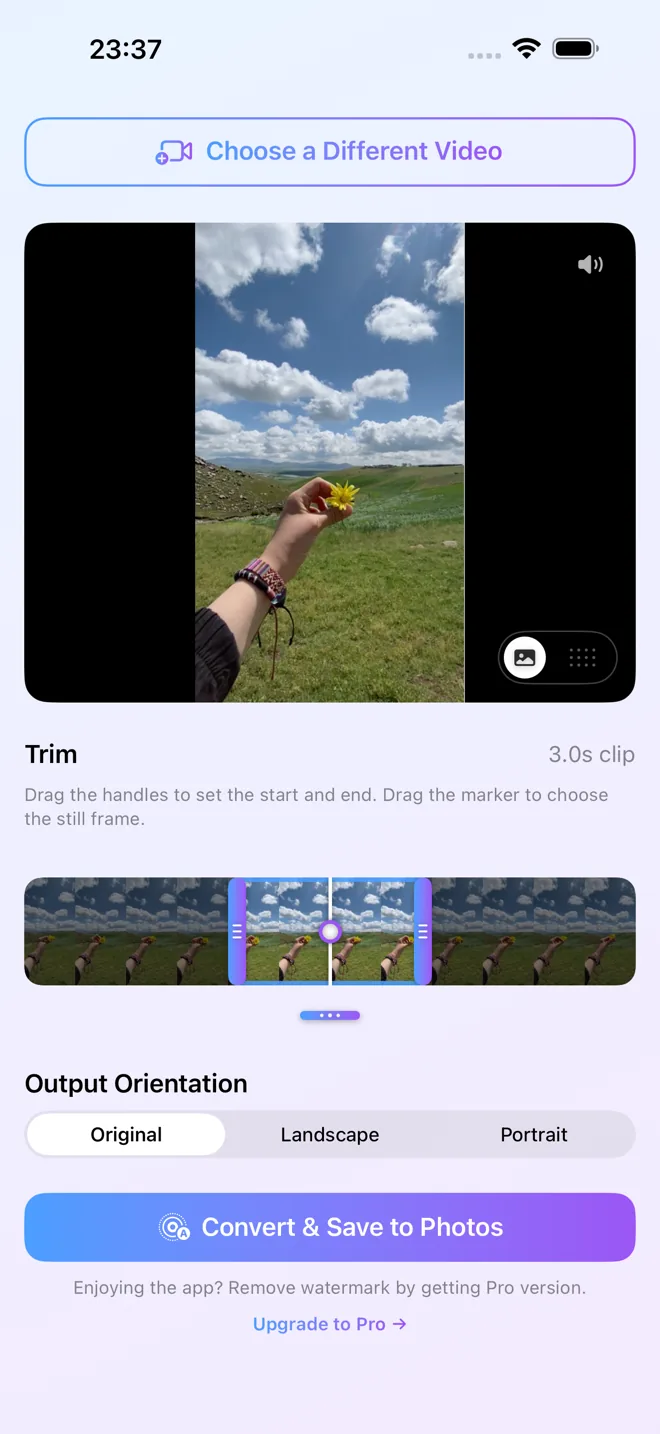
Open LiveMaker and choose any clip from your Photos library or the Files app. There's no length limit on the source — a two-second clip or a twenty-minute recording both work, because you'll trim down to the moment you want in the next step. Videos shared to you in chats work too, as long as you've saved them to Photos or Files first.
-
Trim and choose the key frame
Drag the timeline handles to select your window. A Live Photo is a short format — think a wave breaking, a smile, a candle being blown out — so tighter is almost always better. Then move the marker to choose the still (key) frame: that's the image people see before the Live Photo plays, and the one that represents it in your photo grid. Pick a sharp, well-composed frame, not a motion-blurred one.
If you want a different composition, crop or change the orientation here as well — for example, cropping a landscape clip to portrait so it fills a lock screen properly.
-
Save to Photos
Decide whether to keep the clip's audio — you can include it or leave it out at export. Then tap Convert & Save. Your new Live Photo lands straight in your camera roll with the familiar Live badge, ready to press-and-hold to play, share, or set as a wallpaper.
Choosing a clip that makes a great Live Photo
The conversion itself takes seconds; the difference between a mediocre Live Photo and a great one is the segment you choose. A few things that consistently help:
- One clear motion. A single readable movement — a jump, a laugh, steam rising from a cup — reads far better in a short loop than a busy scene with many things happening.
- Steady footage. Handheld shake that's invisible in a long video becomes very noticeable in a few looping seconds. Segments where the camera is still (or moving smoothly) look dramatically better.
- A key frame that stands alone. The still frame is what shows in your photo grid and before playback, so treat it like choosing the photo itself: in focus, well lit, good composition.
- Good light. A Live Photo can only be as sharp as the video frames it came from, and video frames in dim light are noisy. Bright scenes convert noticeably better.
- An ending near the beginning. If the last frame of your segment resembles the first — a pendulum mid-swing, a flag in the wind — the motion feels natural when it replays, instead of visibly jumping back to the start.
Screen recordings, saved clips, and old footage
Anything that lives in your Photos library or Files app as a video can become a Live Photo — it doesn't have to be something you filmed with the Camera. Screen recordings convert the same way camera footage does, and so do clips friends sent you in chats, once you've saved them to your library. Old videos are a particularly good source: because there's no length limit and you trim inside the app anyway, you can pull a three-second moment out of a rambling ten-minute family video from years ago and give it a second life as a Live Photo on your lock screen.
Set your Live Photo as a lock-screen wallpaper
One of the most popular uses for a converted Live Photo is a wallpaper that moves. Once your Live Photo is saved, go to Settings → Wallpaper → Add New Wallpaper → Photos and choose it. On supported iPhone models and iOS versions the lock screen plays the motion; a portrait crop (step 2) makes sure the subject fills the screen instead of being cut off. If the wallpaper stays still, see the troubleshooting section below.
For the full walkthrough, including framing tips and the fixes for a wallpaper that won't animate, see how to set a video as live wallpaper on iPhone.
How LiveMaker fits in — and what it doesn't do
LiveMaker is a single-purpose converter, and that's deliberate. It turns a video into a Live Photo with trimming, key-frame selection, cropping, and an audio on/off choice — and it does the whole job on your device. Your footage is never uploaded anywhere, which is exactly the difference between an app like this and the web-based converter sites: a browser tool has to send your video to a server to process it. For family clips or anything private, on-device processing is the safer default, and it's also why LiveMaker works offline.
Equally important is what LiveMaker does not do. It isn't a general video editor — there are no effects, titles, or multi-clip timelines; for that, edit the video first in another app and convert the result. There's no Android version and no web version: Live Photos are an Apple format, and LiveMaker is an iPhone/iPad app only. And while the app is free to download and use, free exports carry a small watermark — a one-time $3.99 LiveMaker Pro purchase removes it. There's no subscription.
Troubleshooting
My Live Photo won't play
In the Photos app, press and hold the photo itself — a tap only opens it. Look for the Live badge in the corner: if it's there, the file is a genuine Live Photo. If you're viewing it inside another app that only displays still images, it will look static there even though the motion is intact in Photos.
The Live Photo didn't save
Check that LiveMaker is allowed to add to your photo library: Settings → Privacy & Security → Photos → LiveMaker. Nearly-full storage can also make saving fail — free up space and convert again.
My wallpaper doesn't animate
Press and hold the lock screen to trigger playback, and make sure Low Power Mode is off — iOS pauses motion effects to save battery. Wallpaper animation also depends on your iPhone model and iOS version, so if a friend's phone behaves differently, that's usually why rather than anything wrong with the Live Photo itself.
It arrived as a still image when I shared it
Many messaging apps and social platforms flatten Live Photos to a regular photo when you send them. The original in your library is untouched — it's the receiving platform that dropped the motion. AirDrop and iMessage (with Live enabled on the preview) keep Live Photos intact between Apple devices.
Frequently asked questions
Is LiveMaker really free?
Yes — LiveMaker is free to download and use. Free exports include a small watermark; a one-time $3.99 LiveMaker Pro purchase removes it. There is no subscription.
Is there a length limit on the video I convert?
No — the source video can be any length. A Live Photo itself is a short format, so you trim down to the few seconds you want inside the app before converting.
Will my Live Photo keep the sound?
That's up to you — when you export, you choose whether to include the clip's audio or save the Live Photo silent.
Is there an Android or web version of LiveMaker?
No. Live Photos are an Apple format, and LiveMaker is an iPhone/iPad app only — there is no Android app and no web version. Conversion happens entirely on your device, so nothing is ever uploaded.
Try it yourself
Turn your next clip into a Live Photo in seconds — free, on-device, no upload.
Download LiveMaker — FreeWant more? Read how to turn a GIF into a Live Photo on iPhone, how to convert a Live Photo to a video, or browse the rest of our Live Photo guides — including a natively written Japanese version of this guide at 動画をライブフォトに変換する方法.